

China Single Phase STS Keypad Prepaid Meter Explained for Smart Prepaid Electricity Management
2026-11-27
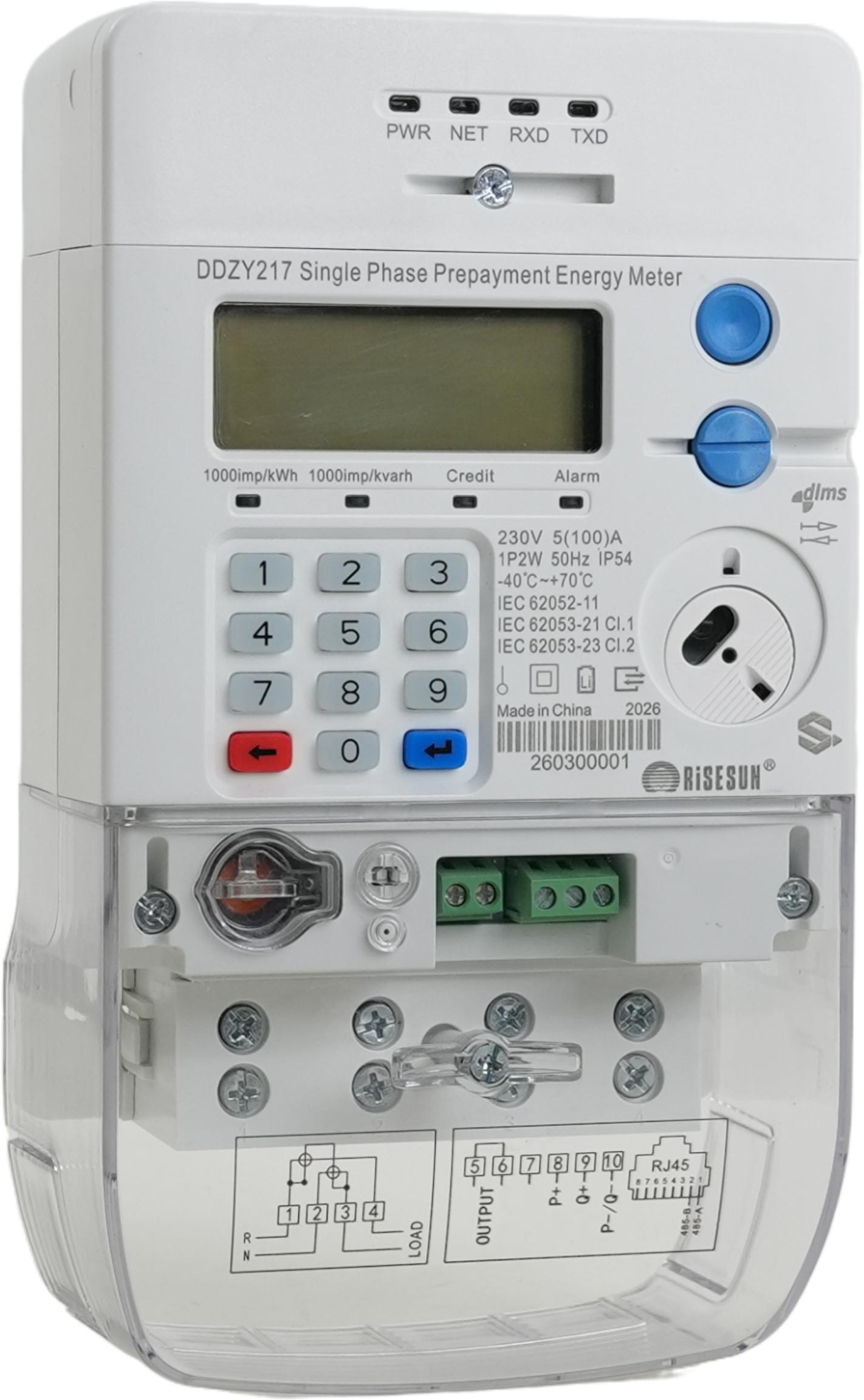
Most prepaid electricity discussions stop at policy or pricing, but the real operational headache is simpler: how do you collect revenue without chasing tenants or sending staff to read meters? A China-made single-phase STS keypad prepaid meter changes that. It turns an ordinary residential connection into a pay-as-you-go service through a 20-digit token entered on a keypad—no smart card or permanent network link required. This guide explains how STS tokens work, why the keypad approach suits single-phase households, and what to check before deployment. For utilities and property managers comparing hardware, Risesun offers single-phase prepaid metering options worth reviewing.
Inside a Single Phase STS Keypad Meter from China
Opening the compact enclosure reveals how much is packed into a standard wall-mount footprint. The main board carries a dedicated metering front end that samples voltage and current, feeding a microcontroller responsible for energy calculations and STS token decoding. A small toroidal transformer or resistive dropper supplies the low-voltage rail, while the load side terminates at a clearly marked relay or latching contactor.
The keypad itself is usually a silicone rubber assembly with carbon contacts that press directly onto pads on the PCB, avoiding a separate wiring harness. Next to it sits a battery holder or soldered coin cell that keeps the real-time clock alive during outages so token-based credit and time-of-use data are not lost. The LCD is often mounted through a zebra strip, which makes assembly simple but requires careful alignment when the unit is opened.
What stands out on Chinese-built units is the mix of standard metering blocks and custom firmware. The STS encryption layer is handled in software, so the same hardware platform can be configured for different utilities by changing the code and meter constants. That modularity keeps production costs low, but it also means the physical build quality varies noticeably between suppliers, especially around soldering, creepage slots, and terminal torque.
Recharging Without an App or Internet Connection
Most of the time, charging comes down to the hardware in your hands. You plug the cable into a wall adapter, a laptop, or a car port, and the battery starts pulling power right away. There is no setup screen, no account to verify, and no Wi-Fi or mobile data required. You can even leave the device in airplane mode or turned off completely while the battery refills.
That simplicity becomes especially useful when you are moving through places with spotty coverage. Airports, trains, campsites, and hotel rooms do not always offer a stable connection, but a standard outlet or USB port is usually enough. You do not have to check a companion app or adjust any settings to get a basic charge. The device itself shows you what is happening through its own indicator light or battery icon.
For anyone who likes keeping things uncomplicated, this approach removes a lot of friction. There is less to update, fewer permissions to manage, and no extra software running in the background. Plug the device in, wait for the light or the on-screen reading, and carry on with your day. The charger works without needing to know where you are, how you use the device, or what network you normally join.
Reading the Keypad Menus and Display Codes Without Guesswork
Most alarm keypads hide their logic behind a wall of blinking lights and two-digit abbreviations. The fastest way to stop guessing is to treat the display as a sequence, not a mystery. Start with the ready light: a steady green or solid red usually means the system is armed or disarmed correctly, while a flicker often points to a zone that has been bypassed or a low battery condition. Pair that with the numeric code on the screen. For example, many panels show a small number followed by a letter such as “d” for delay or “b” for bypass. Write down what you see before touching any buttons, because the code often changes after each keypress.
Once you have the first reading, use the keypad’s menu path instead of random scrolling. Common menus are hidden behind a master code followed by a number like 5 or 8, but the exact entry varies by panel brand. A better habit is to press the star or hash key once and observe the screen: some systems will display a short help text, while others will step through zones in order. Keep your finger off the arm and disarm keys until you know which menu level you are in. If the screen shows “AC” or “LB,” that is not an error in your wiring, it is the panel telling you about power loss or a weak backup battery. Learning these two or three shorthand codes removes most of the guesswork.
For older or unlabeled panels, make a small cheat sheet by triggering one zone at a time and writing down the code that appears. Open a window, watch the display, close it, and move to the next sensor. After ten minutes, you will have a personal translation table that matches your home’s layout. This method works far better than searching for a generic manual because the same code can mean different things on different firmware versions. The goal is not to memorize every possible message, but to understand the pattern: the panel is always trying to tell you which zone changed, what power condition exists, and whether the system is waiting for a command. Read it in that order and the keypad stops being a puzzle.
Wiring and Setup Mistakes That Cause Most Early Failures
Plenty of builds die on the bench before they ever get a chance to run. One of the most common killers is wiring that looks fine from the outside but isn't. Loose crimps, cold solder joints, or power and ground lines run too close to signal wires can cause intermittent resets, erratic sensor readings, or complete brownouts under load. It's rarely one obvious mistake—more often it's a handful of small ones stacking up until the board simply gives up.
Another frequent setup error is skipping a basic continuity and voltage check before applying full power. People trust the silkscreen, trust the pinout diagram, and then discover too late that a connector was mirrored or a buck converter was adjusted while unloaded. Running a system at the edge of its input range, sharing a ground poorly between logic and motors, or leaving floating pins on a microcontroller can all trigger failures that look like defective hardware but are really just setup oversights.
The pattern behind most early failures is haste with the unglamorous parts: connectors, grounds, and power sequencing. A clean schematic means little if the physical build introduces noise, voltage drop, or a reversed cable. Slowing down to verify each rail, tug-test every crimp, and power up sections one at a time prevents the kind of damage that gets wrongly blamed on firmware or cheap components.
How Households Track Daily Consumption and Remaining Balance
Many households keep this simple: a notebook on the kitchen counter or a shared phone note where purchases are written down at the end of the day. The point is not to label every coffee or snack, but to notice when the weekly outflow starts creeping higher than expected.
Some families work with a rough allowance for groceries, fuel, and daily extras, then subtract each expense as it lands. That quick look at the remaining balance before a larger purchase becomes a natural checkpoint, making it easier to wait a day or shift money away from something less important.
Others prefer less manual effort by using prepaid cards with set limits or bank alerts that show the remaining amount after each transaction. The aim is rarely perfect bookkeeping; it is just enough awareness to catch a problem early and adjust before the balance runs out.
Troubleshooting Fault Codes and Tamper Alerts on Site
A fault code on the display rarely means the component itself has failed. Before reaching for a replacement, note the exact code, the timestamp, and what the equipment was doing when it appeared. Many codes are triggered by voltage dips, loose connections, or a sensor reading that temporarily drifted out of range. Clearing the code and recreating the same operating condition often tells you more than the code alone.
Tamper alerts need a slightly different approach because they can point to either a real security event or a simple mechanical issue. Check the cover switches, tilt sensors, and any wiring routed near access panels first. A cable that gets pinched during reassembly or a magnet that sits a few millimetres out of position can produce the same alert as deliberate interference. Compare the alert log with actual entry records or site activity before assuming the worst.
Work through the problem in layers: power and grounding, then communication, then the sensor or switch that generated the code. Once the cause is found, run the equipment through a full start-up and a short loaded cycle rather than trusting an idle test. If the same code comes back under load, the issue is likely still at the connection or harness level, not inside the main control board.
FAQ
It is a prepaid kilowatt-hour meter designed for standard 220 to 240 volt single-phase residential or small commercial supplies. Because it follows the STS protocol, it accepts encrypted 20-digit recharge tokens that can be generated by a utility or third-party vending platform. The unit stores credit, measures consumption, and disconnects the load automatically when the balance runs out.
The user buys a token from a vendor, receives a 20-digit number, then types that number on the meter's keypad and confirms the entry. The meter validates the token, adds energy credit or applies the command embedded in the code, and shows the updated balance on its display. A token cannot be reused, so each purchase needs a fresh code.
It removes the need for monthly readings, paper billing, and chasing unpaid accounts because payment happens before consumption. Owners and utilities get better cash flow, while tenants or customers can track remaining credit and control how much they spend on electricity. The meter also reduces disputes over estimated bills since it records actual use against purchased credit.
Most units built to the STS standard can integrate with third-party vending systems, provided the supply group code, encryption key, and tariff settings match. Some Chinese manufacturers offer their own desktop or online vending software, while others provide an API for token generation. The important part is confirming the key management process before buying large quantities.
When the remaining credit drops to a set threshold, the meter typically gives a visual or audible warning so the user has time to buy more. Incorrect entries are rejected, and after several failed attempts the keypad may lock briefly to slow down guessing. If the balance reaches zero, the internal relay opens and the supply stays off until a valid recharge token is entered.
They usually include sealed enclosures, tamper event logs, reverse current detection, and alarms for magnetic interference or bypass attempts. Some models will disconnect or flag a terminal cover removal in the event log for later inspection. The protections are not absolute, but they make casual meter manipulation much harder to hide.
A single phase meter works with a standard two-wire supply and covers typical homes, apartments, and small shops. Three phase meters are for larger electrical loads and need a different connection arrangement, which makes them bulkier and more expensive. For most residential prepaid projects, the single phase version is the simpler and lower-cost option.
Confirm the meter carries genuine STS certification and ask about the supply group code and encryption key delivery. Check the voltage and current ratings, display and keypad quality, tamper features, and whether the supplier can provide token generation software or integration support. If the meter will be installed on a public grid, also verify local utility approval for the specific model.
Conclusion
Most prepaid meters imported from China rely on a simple but effective combination of a keypad, an STS token, and a local display. The meter body usually contains a shunt or current transformer for measurement, a latching relay for connect and disconnect, and a microcontroller that stores credit and consumption data. Recharging does not depend on a smartphone app or a live internet connection. A customer buys a 20-digit token from a vendor, types it on the keypad, and the meter decodes the encrypted string locally. That makes the system practical in areas where network coverage is poor or where older residents prefer not to deal with phone-based payments. The menus are navigated with a single button or key sequence, and the display shows values like remaining kWh, total used, current load, and sometimes voltage or tamper status. Many early failures come from wiring errors: swapping line and load, leaving a loose neutral, or forgetting to seal the terminal cover. When the relay chatters or the meter refuses to accept a token, the cause is often a bad connection or an incorrect meter number rather than a faulty unit.
Once installed correctly, households tend to check the display at the same time each day, noting the remaining balance and the daily consumption total. Some meters show a low-credit warning or a flashing LED when the balance drops below a set threshold, which gives enough time to buy another token before disconnection. On-site troubleshooting usually starts with reading the fault codes from the keypad menu. These codes can indicate reverse wiring, earth leakage, overload, or a tamper attempt. Tamper alerts often appear after the cover is removed or a strong magnet is placed near the meter. In practice, clearing the alert requires removing the cause, pressing a reset sequence, and sometimes entering a clearing token from the utility. Because all of this happens at the meter itself, the system remains easy for local technicians to maintain without needing remote software or constant network access.
Contact Us
Contact Person: Eric Tian
Email: [email protected]
Tel/WhatsApp: +86-13714190315
Website: https://www.cn-risesun.com/